Hello,
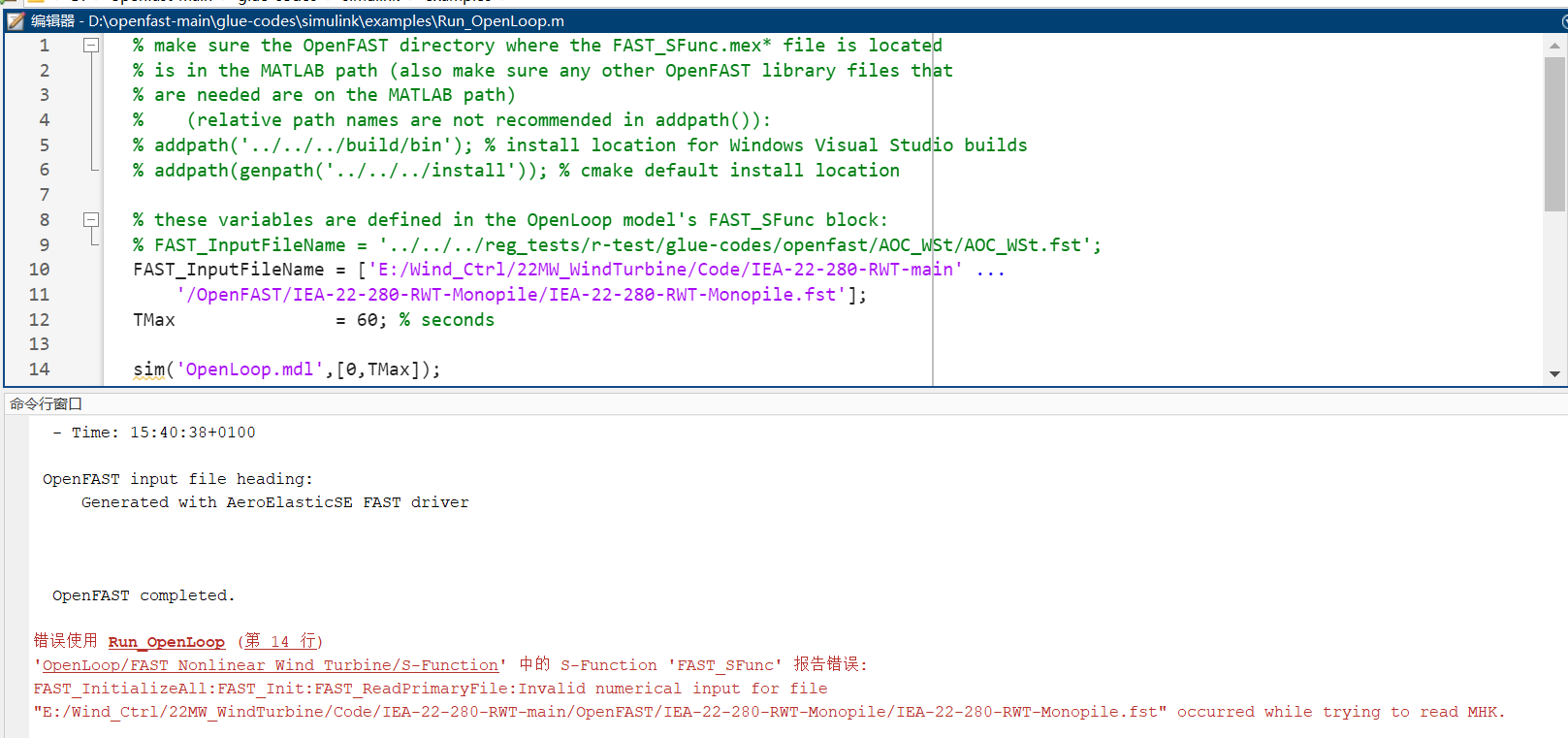
I am encounting an issue when I was using S-function to OpenFAST, the following error shows for the reading process.
Did anyone meet this before.
I would be so grateful if any suggestions are given.
Best regards,
Yong
Unable to perform assignment because the size of the left side is 1-by-7 and the size of the right side is 6-by-1.
Error in HD2Matlab>ParseFASTTable (line 274)
[Table(i,:),~,~,nextIndex] = sscanf(line,‘%f’,nc);
^^^^^^^^^^
Error in HD2Matlab (line 122)
[DataOut.Joints] = ParseFASTTable(line, fid, NJoints);
^^^^^^^^^^^^^^^^^^^^^^^^^^^^^^^^^^
Error in GetFASTPar_Subfile (line 31)
p = HD2Matlab(SubfileName,2); % get parameter data (2 header lines)
^^^^^^^^^^^^^^^^^^^^^^^^
Error in ReadWrite_FAST (line 29)
[HDP, HDFile] = GetFASTPar_Subfile(FP, ‘HydroFile’, fast.FAST_directory, fast.FAST_directory,true);
^^^^^^^^^^^^^^^^^^^^^^^^^^^^^^^^^^^^^^^^^^^^^^^^^^^^^^^^^^^^^^^^^^^^^^^^^^^^^^^^^^
Error in runFAST2 (line 42)
[Param,Cx] = ReadWrite_FAST(fast);
^^^^^^^^^^^^^^^^^^^^
[this_dir,~,~] = fileparts(mfilename(‘fullpath’));
% Compile FAST for use with simulink & mex using openfast docs
fast.FAST_SFuncDir = ‘C:\yongxiang\Code\windctrolcode22mw\IEA-22-280-RWT-main\OpenFAST\IEA-22-280-RWT-Monopile’; %%%% NEED FOR SIMULINK
fast.FAST_InputFile = ‘IEA-22-280-RWT-Monopile.fst’; % FAST input file (ext=.fst)
fast.FAST_directory = ‘C:\yongxiang\Code\windctrolcode22mw\IEA-22-280-RWT-main\OpenFAST\IEA-22-280-RWT-Monopile’; % Path to fst directory files
% Simulink Parameters
% Model
%simu.SimModel = fullfile(this_dir,‘Simulink’,‘ROSCO’);
simu.SimModel = ‘WT’;
% Script for loading parameters
simu.ParamScript = fullfile(this_dir,‘Utilities’,‘load_ROSCO_params’);
%% Simulink Setup
[ControlScriptPath,ControScript] = fileparts(simu.ParamScript);
addpath(ControlScriptPath);
addpath(fast.FAST_SFuncDir);
addpath(‘Utilities’)
%% Read FAST Files & Load ROSCO Params from DISCON.IN
[Param,Cx] = ReadWrite_FAST(fast);
% Simulation Parameters
simu.TMax = Param.FP.Val{contains(Param.FP.Label,‘TMax’)};
simu.dt = Param.FP.Val{contains(Param.FP.Label,‘DT’)};
simu.wPA = 8.6; % Pitch actuator natural frequency, rad/sec
simu.zetaPA = 0.707; % Pitch actuator damping ratio, unitless
simu.PC_MaxRat = 0.3;
[R,F] = feval(ControScript,Param,simu);
%% Premake OutList for Simulink
OutList = {‘Time’};
OutList = [OutList;
Param.IWP.OutList{1,1};
Param.EDP.OutList{1,1};
Param.ADP.OutList{1,1};
Param.SvDP.OutList{1,1};
];
for iOut = 2:length(OutList)
OutList{iOut} = OutList{iOut}(2:end-1); %strip "s
end
%% Exectute FAST
% Using Simulink/S_Func
FAST_InputFileName = [fast.FAST_directory,filesep,fast.FAST_InputFile];
TMax = simu.TMax;
SimulinkModel = simu.SimModel;
%%%Load the NN parameters
warning off
s_dim = 3; % state dimension
a_dim = 3; % action dimension
par_memory_all = ;
controller_update_num = 200;
% disp(update_num);
%controller_update_num = update_num;
init_idx = 1;
model = ‘WT’;
load_system(model);
actor_net_path = [pwd, ‘\Networks\Actor\Actornet.mat’];
critic_net_path = [pwd, ‘\Networks\Critic\Criticnet.mat’];
%
Actor_net = importONNXNetwork([‘Networks\Actor\actor_’,num2str(controller_update_num),‘.onnx’], ‘InputDataFormats’, ‘BC’, ‘OutputLayerType’, ‘regression’, ‘TargetNetwork’, ‘dlnetwork’);
save(actor_net_path,‘Actor_net’)
set_param([model,‘/PPO Controller/Actor’],‘NetworkFilePath’, actor_net_path)
%
Critic_net = importONNXNetwork([‘Networks\Critic\critic_’,num2str(controller_update_num),‘.onnx’], ‘InputDataFormats’, ‘BC’, ‘OutputLayerType’, ‘regression’, ‘TargetNetwork’, ‘dlnetwork’);
save(critic_net_path,‘Critic_net’)
set_param([model,‘/PPO Controller/Critic’],‘NetworkFilePath’, critic_net_path)
Out = sim(SimulinkModel, ‘StopTime’, num2str(simu.TMax));
sigsOut = get(Out,‘sigsOut’); %internal control signals
%% Get OutData
SFuncOutStr = ‘.SFunc’;
% Try text first, then binary
[OutData,OutList] = ReadFASTtext([fast.FAST_directory,filesep,fast.FAST_InputFile(1:end-4),SFuncOutStr,‘.out’]);
if isempty(OutData)
[OutData,OutList] = ReadFASTbinary([fast.FAST_directory,filesep,fast.FAST_InputFile(1:end-4),SFuncOutStr,‘.outb’]);
end
% Dump data to structure
for i = 1:length(OutList)-6
simout.(OutList{i}) = OutData(:,i);
end
observation = squeeze(Out.observation)‘; % dim 6
action_std = squeeze(Out.action_std)’; % action 3 + logprob dim 4
epi_memory = [observation, action_std]; % dim 10
reward = Out.reward.Data;
value = Out.value;
epi_rewards = [reward, value]; % dim 2
mu = squeeze(Out.mu)‘;
sigma = squeeze(Out.sigma)’;
epi_act_output = [mu, sigma]; % dim 6
reshape_epi_memory = epi_memory(init_idx:end, 1: s_dim+a_dim+1); % state & action_sampled & logprob dim=7
reshape_epi_reward = epi_rewards(init_idx:end, :); % dim=2
reshape_epi_act_output = epi_act_output(init_idx:end, :); % dim=6
par_memory = [reshape_epi_memory, reshape_epi_reward, reshape_epi_act_output];
par_memory_all = [par_memory_all; par_memory];
%
disp(‘Simulation is over.’);
save([‘Memories/par_memory_’,num2str(controller_update_num),‘.mat’], ‘par_memory_all’)